
WhatsApp Request Review(2026):
UnbanFast with Free AI
⚠️ Email appeals no longer work. Submit a WhatsApp request review with our free AI tool and get unbanned faster.
Generate Your Message
Fill in the details below and get a tailored appeal message in seconds.
Optimized for: request a review, account banned review.
How to Request Review for WhatsApp Banned Account
(2026 Official Guide)
Step 1: Open the In-App Review Option
Launch WhatsApp on your phone (even if banned). You’ll see a screen saying your account is not allowed to use WhatsApp. Tap the Request a review button.
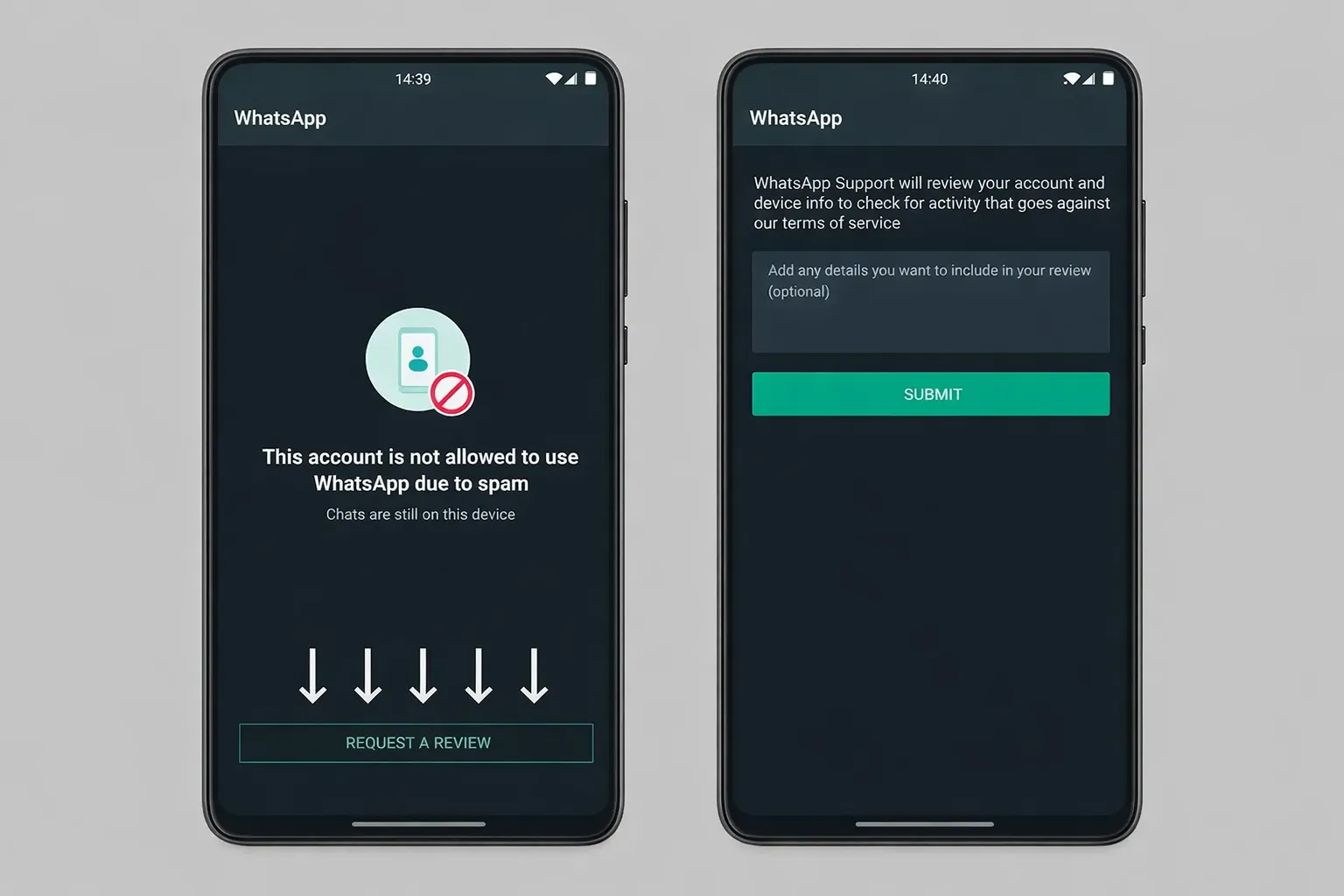 whatsappRequestReview.guide.image_labels.1
Step 2: Paste Your Professional Appeal Message
Copy the message generated above. Paste it into the text box provided. Tap Submit. WhatsApp will review within 24–72 hours.
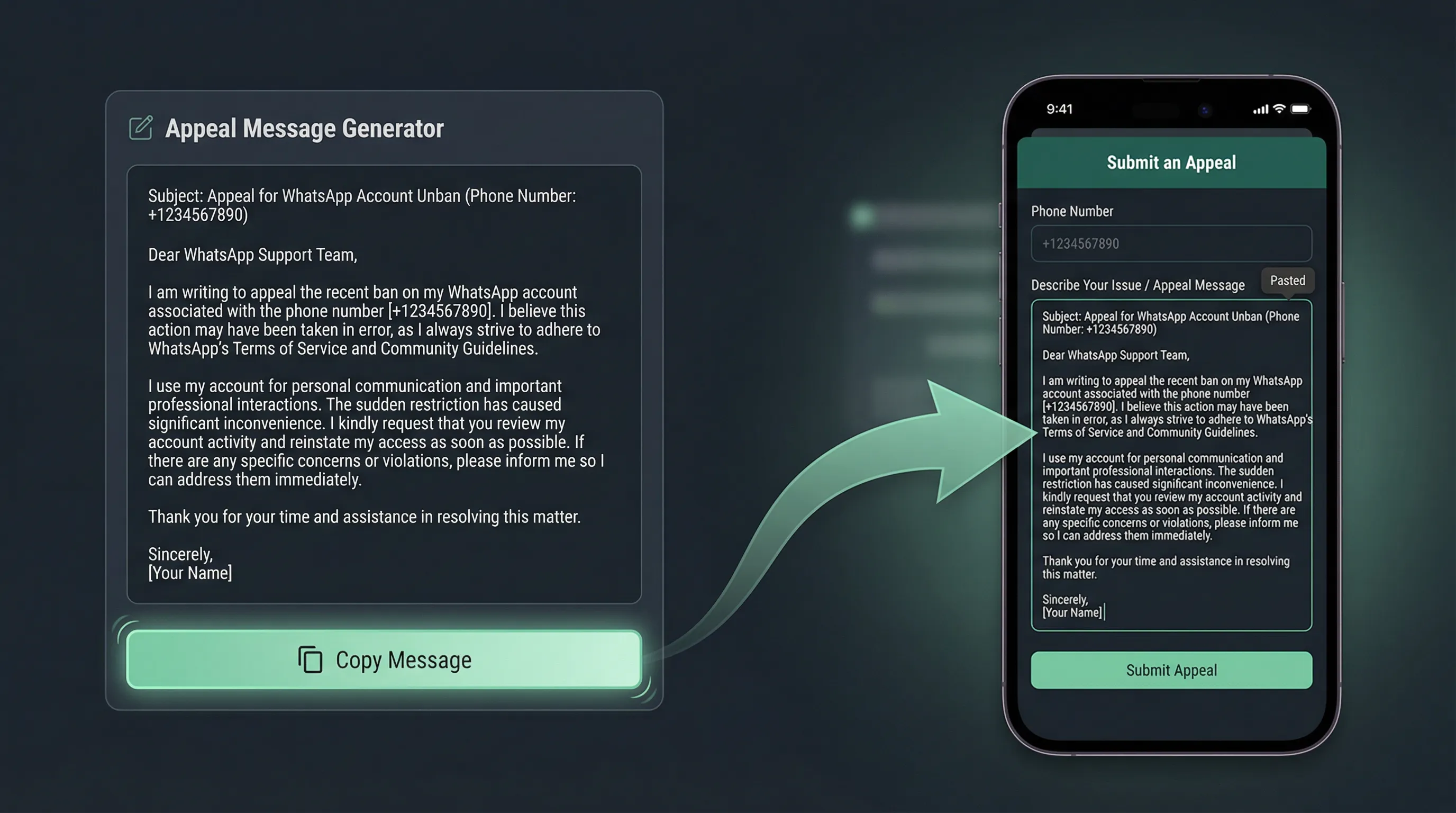 whatsappRequestReview.guide.image_labels.2
Why You Need to Warm Up Your WhatsApp Account After Unblocking
Getting unbanned is great — but restored accounts usually have very low WhatsApp trust score and WhatsApp account weight. This means they’re extremely fragile and can get re-banned quickly if you start messaging normally right away.
To safely increase WhatsApp account health and avoid future bans:
- ✓ Gradually rebuild trust with natural interactions
- ✓ Use AI-powered warmup tools to simulate real user behavior
- ✓ Restore account weight before any marketing or group activity
"My account was restored but got banned again in 2 hours!"
"Using Warmer tool for 7 days made my account invincible."
WhatsApp "Request a Review"
Message Templates (Copy & Paste)
If your account has been banned, you can submit an appeal directly in the app. Below are 4 ready-to-use WhatsApp appeal message templates you can copy and submit.
General Misunderstanding
Business Communication
Suspicious Activity Detection
Quick Appeal
Pro Tip: Polite and professional review requests increase restoration success.
Frequently Asked Questions
How to request review for WhatsApp if my account is banned?
Open WhatsApp, tap "Request a review," paste a strong appeal message (use our generator), and submit.
What is the best WhatsApp request review message to get unblocked?
A polite, clear message that emphasizes compliance without admitting fault. Our AI creates the most effective version based on your scenario.
Why should I use a professional appeal for WhatsApp ban?
Generic or emotional messages are often rejected. Professional, structured appeals have much higher success rates.
How can I improve my WhatsApp trust score after being restored?
Start with very light activity and gradually increase. A dedicated warmup tool makes this process safe and fast.
Why is WhatsApp account weight important?
It determines how much activity your number can handle without triggering spam filters. Low weight = high risk of re-ban.
Ready to get your account back?
Generate your custom WhatsApp ban appeal message now! 🚀