
How to Manage Multiple WhatsApp Accounts Efficiently in 2026

If you work in international sales, eCommerce, affiliate marketing, or customer support, you've probably reached a point where a single WhatsApp account is no longer enough.
At first, one account works perfectly.
Then the business grows.
More leads come in, different markets need separate communication channels, and team members start sharing the workload.
That's usually when people begin searching for WhatsApp multi account management solutions.
The challenge isn't simply logging into multiple WhatsApp accounts.
The real challenge is managing them efficiently without creating operational chaos.
After testing different approaches over the years, here's what I've learned about managing multiple WhatsApp accounts and which solutions make the most sense in 2026.
Why Businesses Need Multiple WhatsApp Accounts
A lot of people ask:
Why not just use one WhatsApp account for everything?
In practice, that becomes difficult very quickly.
For example:
- Sales teams need separate accounts for prospecting.
- Customer support teams need dedicated support channels.
- Different countries may require different phone numbers.
- Agencies often manage accounts for multiple clients.
As account volume increases, separating communication streams becomes necessary.
Using multiple WhatsApp accounts also helps organize conversations and makes team collaboration much easier.
Does WhatsApp Officially Support Multiple Accounts?
Yes, but only to a limited extent.
WhatsApp introduced multi-account support for Android users, allowing two accounts to be logged into the same app simultaneously.
The setup process is straightforward:
- Open WhatsApp Settings.
- Tap the account dropdown menu.
- Select "Add Account."
- Verify the second phone number.
For personal users, this is a useful improvement.
However, once you need three, five, or ten accounts, the official solution quickly reaches its limit.
Method 1: Managing Accounts Through Multiple Browsers
This is one of the most common approaches people try first.
The idea is simple:
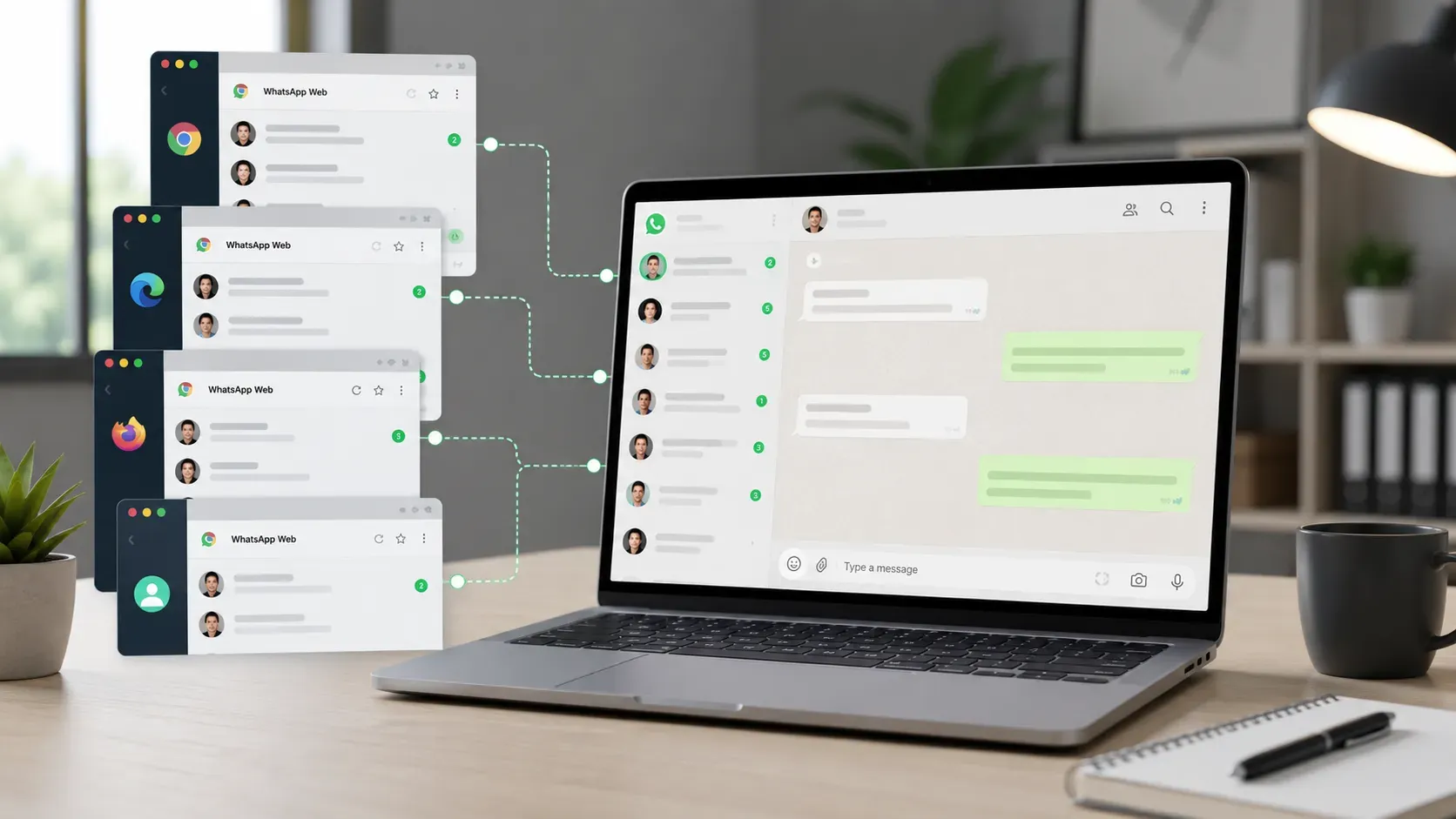
- Chrome logs into one account.
- Edge logs into another.
- Firefox handles a third account.
- Additional browser profiles support even more accounts.
At first, this feels like a clever solution.
But after a few weeks, several problems usually appear:
- Too many browser windows.
- Missed messages.
- Difficult account switching.
- Occasional disconnections.
For managing a handful of accounts, it can work reasonably well.
For larger operations, it becomes increasingly difficult to maintain.
Method 2: Using Cloud Servers for WhatsApp Account Management
Some teams choose to run WhatsApp accounts on remote Windows servers.
The main advantage is that accounts stay online even when local computers are turned off.
This setup is commonly used by businesses that require continuous availability.
However, there are trade-offs:
Higher Operating Costs
Besides server expenses, teams often invest in additional network resources and maintenance.
Technical Complexity
Managing servers requires ongoing attention:
- Browser updates
- Connection stability
- System maintenance
- User permissions
For technical teams, this may be manageable.
For most sales teams, however, it introduces unnecessary complexity.
The Real Problem Starts When Account Numbers Grow
Something interesting happens once you start managing 10, 20, or even more WhatsApp accounts.
The problem is no longer:
"How do I log into multiple accounts?"
The problem becomes:
"How do I keep everything organized?"
Questions start appearing every day:
- Which account received the message?
- Who is responsible for this customer?
- Has this lead already been followed up?
- Where is the conversation history stored?
This is where many teams realize that account management is actually a workflow problem rather than a login problem.
Why More Teams Are Moving Toward Unified Management Platforms
As businesses scale, managing accounts through individual browsers becomes increasingly inefficient.
Many teams eventually adopt centralized solutions that allow them to view multiple WhatsApp accounts from a single workspace.
The goal isn't simply convenience.
It's about maintaining visibility and consistency across the entire customer communication process.
A unified workflow helps teams:
- Monitor conversations more efficiently.
- Keep customer history organized.
- Reduce internal confusion.
- Improve response times.
- Simplify collaboration between team members.
For growing businesses, these operational benefits often matter far more than the ability to log into another account.
Why Account Warm-Up Is Becoming Part of Multi Account Management
Over the last few years, another trend has become increasingly common.
Businesses are paying more attention to account health.
New accounts often need time to establish normal usage patterns before being heavily used for customer communication.
Many teams now incorporate account warm-up into their account management process.
Typical activities include:
- Maintaining regular conversations.
- Building natural interaction history.
- Gradually increasing activity levels.
- Keeping accounts consistently active.
Instead of treating account management and account warm-up as separate tasks, more businesses are combining them into a single workflow.
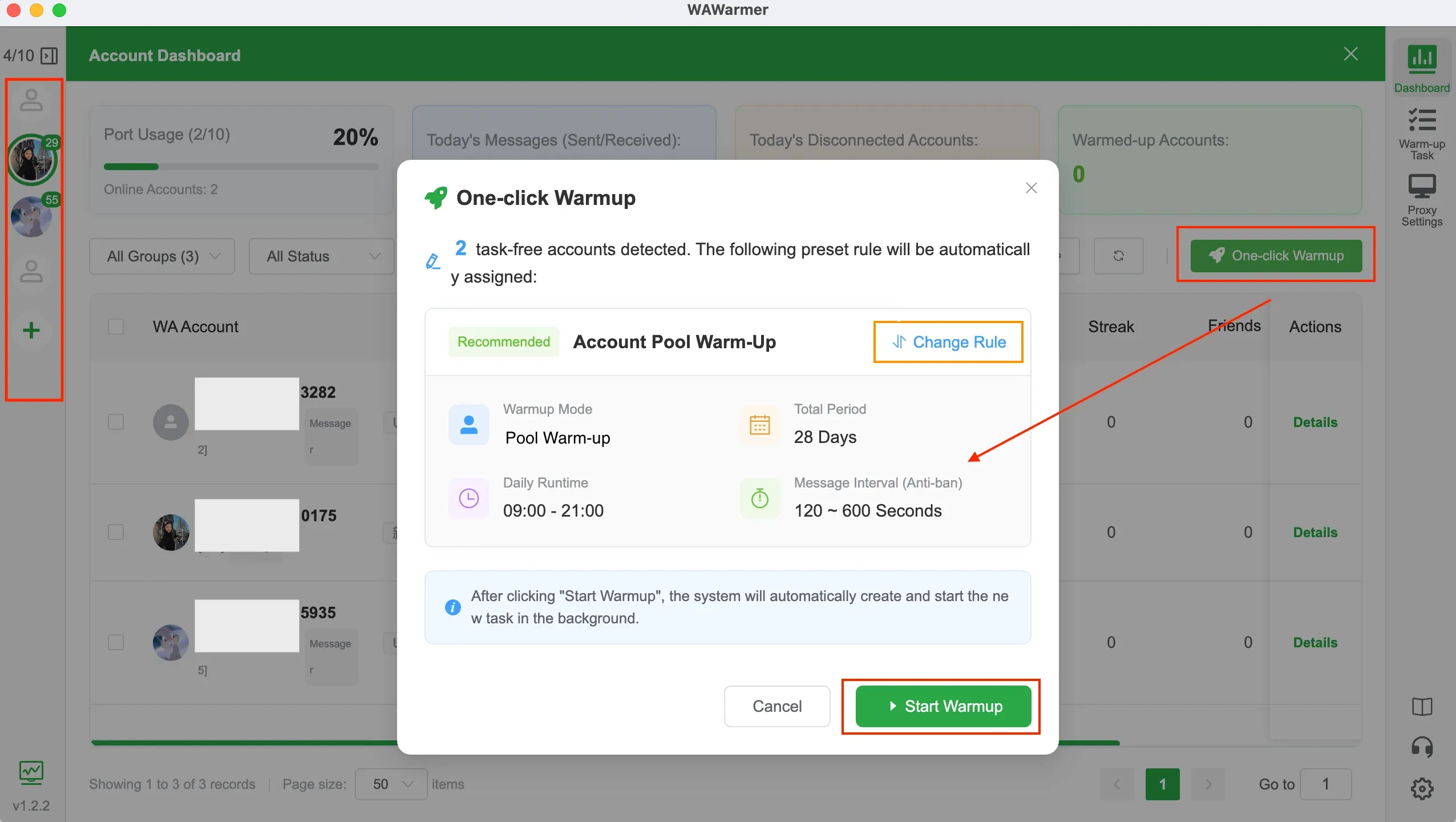
This is one reason tools like WAWarmer have gained attention among teams operating multiple WhatsApp accounts.
Beyond helping organize accounts, they also assist with maintaining account activity and reducing the amount of manual effort required to keep accounts active.
Which WhatsApp Multi Account Management Method Is Right for You?
The best approach depends largely on the number of accounts you manage.
1–2 Accounts
The official WhatsApp multi-account feature is usually sufficient.
3–5 Accounts
Browser-based management can still work if account activity remains relatively light.
5–20 Accounts
A centralized management solution typically becomes much more practical.
20+ Accounts
At this scale, account organization, team workflows, and account maintenance often become more important than the login process itself.
Final Thoughts
WhatsApp has made significant improvements to multi-account support in recent years.
However, for growing businesses, managing multiple WhatsApp accounts involves much more than simply staying logged in.
Customer communication, team collaboration, conversation history, and account maintenance all become part of the equation.
The right solution ultimately depends on your business size and workflow requirements.
But one thing remains consistent:
As account numbers increase, efficient management becomes far more important than the ability to access another account.
How to Use Dedicated IPs for Multiple WhatsApp Accounts
Does your IP environment affect account stability when managing multiple WhatsApp accounts? This article explains account linking risks, dedicated IPs, proxy setup, and account operations to help you build a more reliable WhatsApp account environment.
WhatsApp Shadowban: Signs, Causes, and How to Fix It
Is your WhatsApp account shadowbanned? Learn how to detect a WhatsApp shadowban, understand why it happens, and apply proven methods to recover account visibility and message deliverability.