
2026 India WhatsApp Bulk Messaging Guide: Protect Your Account Health While Scaling
India is the largest WhatsApp market on earth—over 500 million users—and also one of the strictest when it comes to messaging compliance. If you run bulk campaigns there, the fastest way to lose is to treat it like a Western market. This guide is a compliance-first playbook built around one idea: protect your account health first, scale second.
Note: Numbers below reflect our team's operational observations, not Meta-published figures. Always confirm current limits in your WhatsApp Business Manager.
1. India Compliance Basics You Cannot Skip
Before you send a single template, three local realities shape everything:
- TRAI DND registry: India's Telecom Regulatory Authority runs a Do-Not-Disturb registry. Sending promotional messages to DND-registered numbers is a violation. Pull your audience against DND status before any campaign.
- Explicit opt-in is required: Under Meta's policy and Indian norms, users must have clearly consented to receive messages from your business. No consent means no template approval and higher spam reports.
- Template approval and opt-out: Every outbound template is reviewed by Meta. Every message must offer a clear way to opt out. Ignoring opt-out requests damages your Quality Rating fast.
Rule of thumb: If the consent trail is weak, the campaign will cost you more in account health than it returns in reach.
2. Why Account Health Comes Before Volume
Meta scores every business number with a Quality Rating (Green / Yellow / Red) and a Messaging Limit (how many unique users per day you may message). The limit only grows while your rating stays Green. Push volume on a Yellow or Red number and you get throttled—exactly when you need reach most.
So the India playbook is not "blast more." It is "warm the number, keep it Green, then let the limit rise."
3. The 21-Day Account Warming Protocol
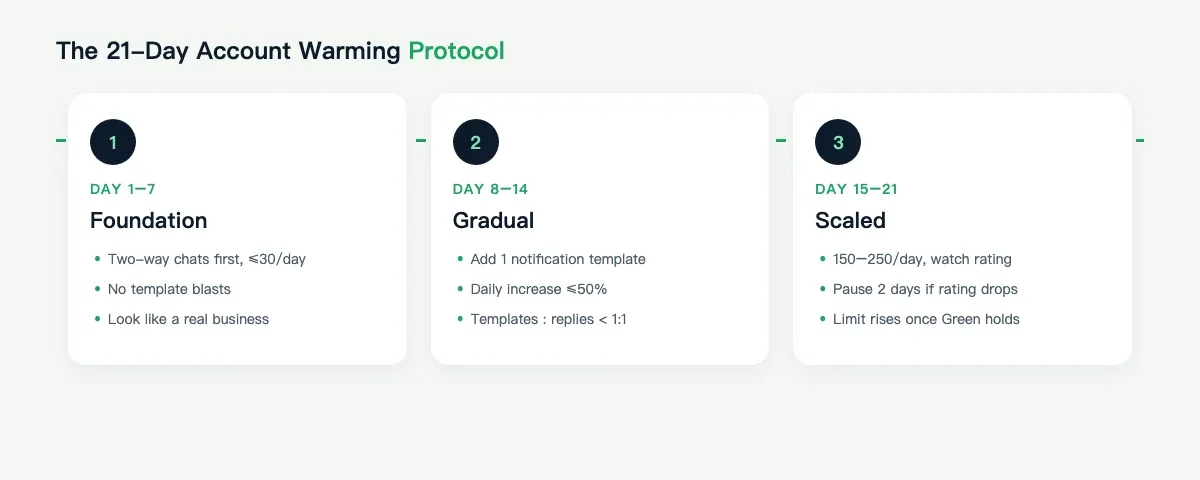
This is the cadence our team uses for new India numbers. It is deliberately slow—the goal is a natural interaction pattern, not a send spike.
Days 1–7: Foundation (Low Volume, Two-Way)
- Daily cap: about 20–30 messages, mostly session messages and replies, not templates.
- Activity: answer inbound inquiries, confirm orders, and send service updates.
- Goal: establish the number as "used by a real business," not a broadcast bot.
Days 8–14: Gradual Template Use
- Daily cap: about 50–80 messages.
- Introduce one approved template for transactional or notification use.
- Keep the template-to-session ratio under 1:1 (more replies than broadcasts).
Days 15–21: Scaled and Monitored
- Daily cap: about 150–250 messages, only after the rating holds Green.
- Watch spam reports daily; if reports rise, pause for two days.
The single most common mistake we see is jumping from Day 3 to "send 500 today." That spike is what turns a fresh India number Yellow within 48 hours.
4. Sending Cadence and Limits
- Spread sends across the day (Indian business hours: about 9:30–18:30 IST). Avoid hourly bursts.
- Cap each number at 30%–50% of its current Messaging Limit while warming; only approach the full limit once Green is stable for two or more weeks.
- Localize timing to festivals such as Diwali, Holi, and Raksha Bandhan. Engagement rises, but so does competitor noise—keep templates softer and opt-in tighter.
- Consider pricing in context: India template messaging is among the lowest-cost globally, which tempts over-sending. Cheap is not a reason to spam.
5. Tools That Help (Used Correctly)
A number of tools exist for account health and sending management—including our own WAWarmer, which our team built to automate the low-intensity, two-way interaction pattern described above, so new numbers can reach a stable Green without manual babysitting.
The tool is only ever a helper. The non-negotiables are still real opt-in, clean DND filtering, approved templates, and a cadence that respects the number's health.
We do not claim any tool makes an account "ban-proof." Account health is a behavior outcome—tools optimize the behavior; they do not override the policy.
For a deeper look at building early account history, read our WhatsApp account warm-up guide.
6. A Before-and-After Snapshot (Observed)
One India D2C brand we worked with came in sending about 400 templates per day from a seven-day-old number. Its rating was already Yellow and its limit was stuck. After switching to the 21-day protocol—starting at 25 messages per day and prioritizing two-way interactions—the number reached Green in week three and the Messaging Limit auto-upgraded. Within six weeks, the brand was sending more per day than before, and the limit kept climbing because the rating held.
The volume did not change because the team pushed harder. It changed because the account was trusted.
7. FAQ
Q: Can I just buy a "warmed" India number?
A: You can rent aged numbers, but the rating is behavioral—a bought number still needs the right interaction pattern or it drifts Yellow. Warm the behavior, not just the age.
Q: Do I need DND filtering for transactional messages?
A: Transactional and service messages are treated differently, but filtering your list against DND and keeping opt-in proof is still best practice and protects your rating.
Q: How fast does the Messaging Limit rise?
A: Meta reviews limits on a rolling basis. With a stable Green rating, upgrades typically unlock on the regular review cycle. There is no shortcut that is also safe.
Summary
India rewards patience. Filter DND, earn opt-in, warm the number over 21 days, keep the Quality Rating Green, and let the limit grow on its own. Scale the health, and the volume follows.
Related: Our explainer on WhatsApp Quality Rating and account health covers the Green / Yellow / Red mechanics in depth. If you run multiple India numbers, our multi-account guide breaks down how limits and ratings interact across a fleet.
WhatsApp Proxy Guide: Setup, Types and Common Issues in 2026
How does a WhatsApp proxy actually work? Learn proxy types (HTTP, SOCKS5, VMess, VLESS), setup basics, common connection problems, and how multi-account teams configure them.
WAWarmer vs WhatSender: Bulk Sending vs Account Warming (2026)
WAWarmer vs WhatSender — an honest look at two different jobs: WhatSender fires bulk WhatsApp messages from your PC, WAWarmer warms accounts up first so sending stays safe. Pricing, methods, and how they fit together.